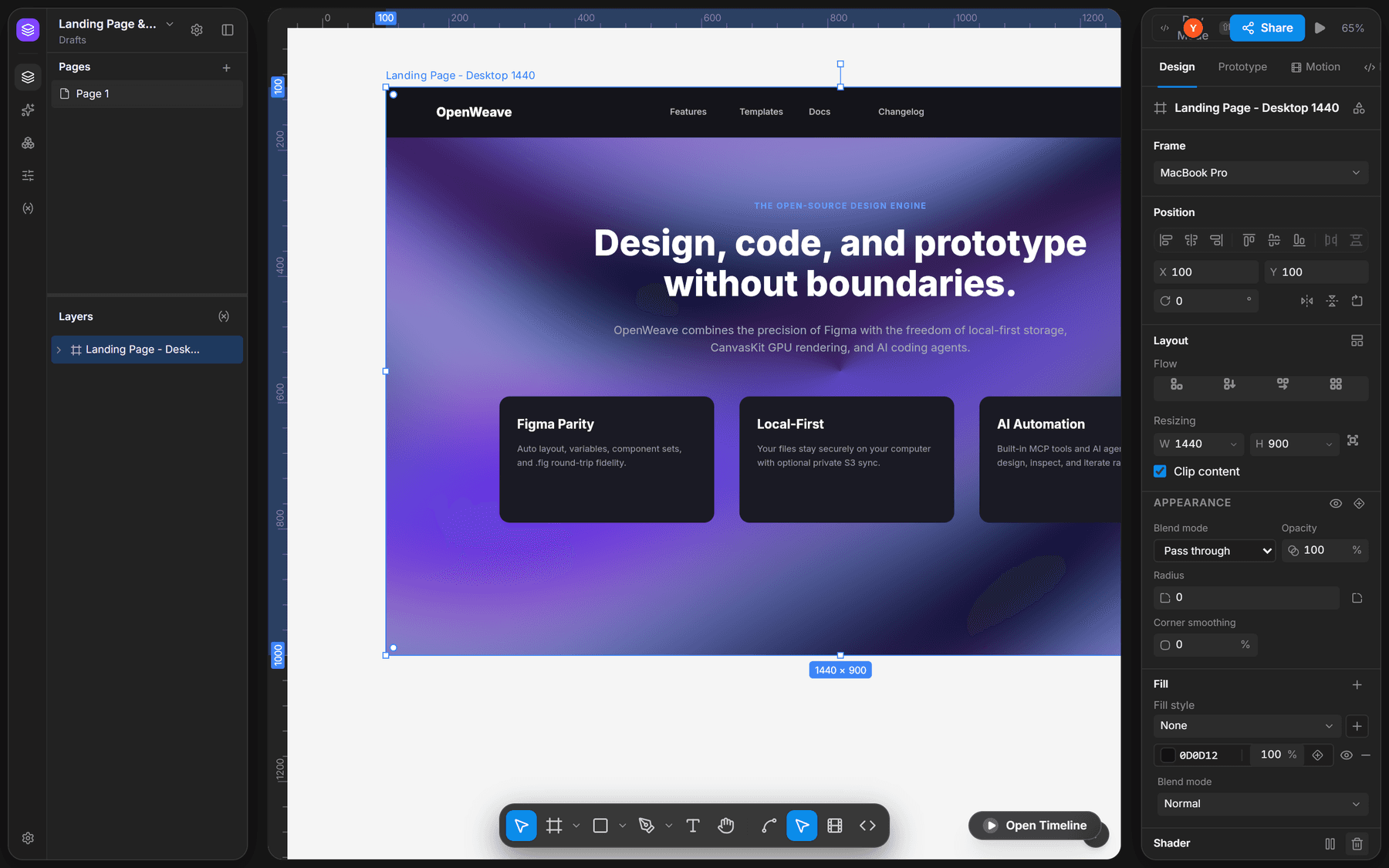
Overview
OpenWeave is a design editor that opens native Figma (.fig) and Pencil (.pen) files, keeps them on your disk, and lets you program the editor itself: a command-line tool, an MCP server for AI agents, and a headless SDK for building your own editing surfaces.
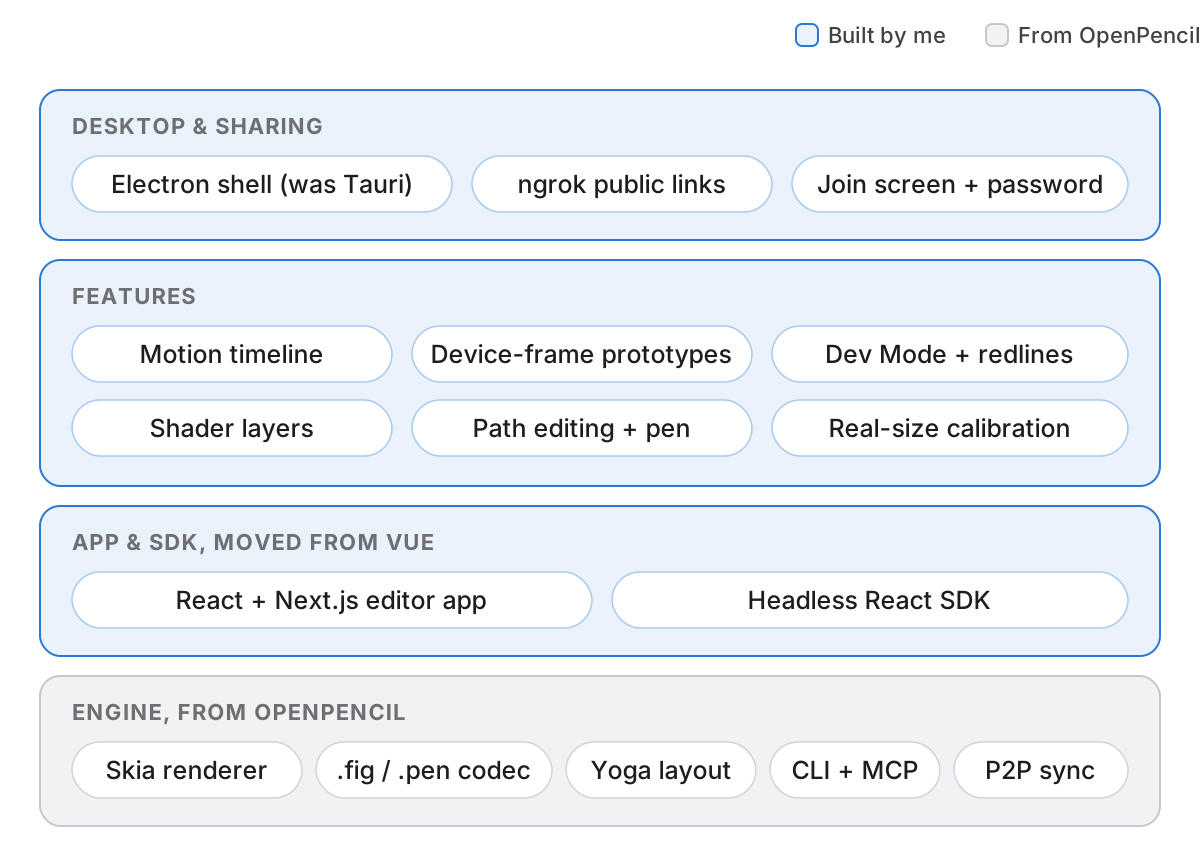
It didn't start from a blank page. OpenWeave is a fork of OpenPencil, Danila Poyarkov's MIT-licensed editor, which already had the hard foundation: a Skia renderer, a Figma file codec, auto layout on Yoga, and the CLI. I want to be clear about that line, because the interesting part of this project is what I did with a foundation I didn't have to pour.
My part: I moved the app and its SDK from Vue to React and Next.js, moved the desktop app from Tauri to Electron, and designed and built the features that take the editor past static frames: a motion timeline, prototyping on device frames, Dev Mode, live shader layers, vector path editing, and sharing a local file with someone across the internet.
The Problem: Design Stops at the Static Frame
Open-source design tools usually chase parity with the static canvas: frames, auto layout, components. That is the part of design that is most solved. The work that eats a designer's week happens after it: making a toggle feel springy, showing a flow on an actual phone, handing a developer the exact values, and getting a reviewer into the file.
In most teams each of those lives in a different tool. Motion goes to an animation app, prototypes to a viewer, specs to a handoff plugin, and the file sits in someone's cloud. Every hop is an export, and every export is a copy that drifts.
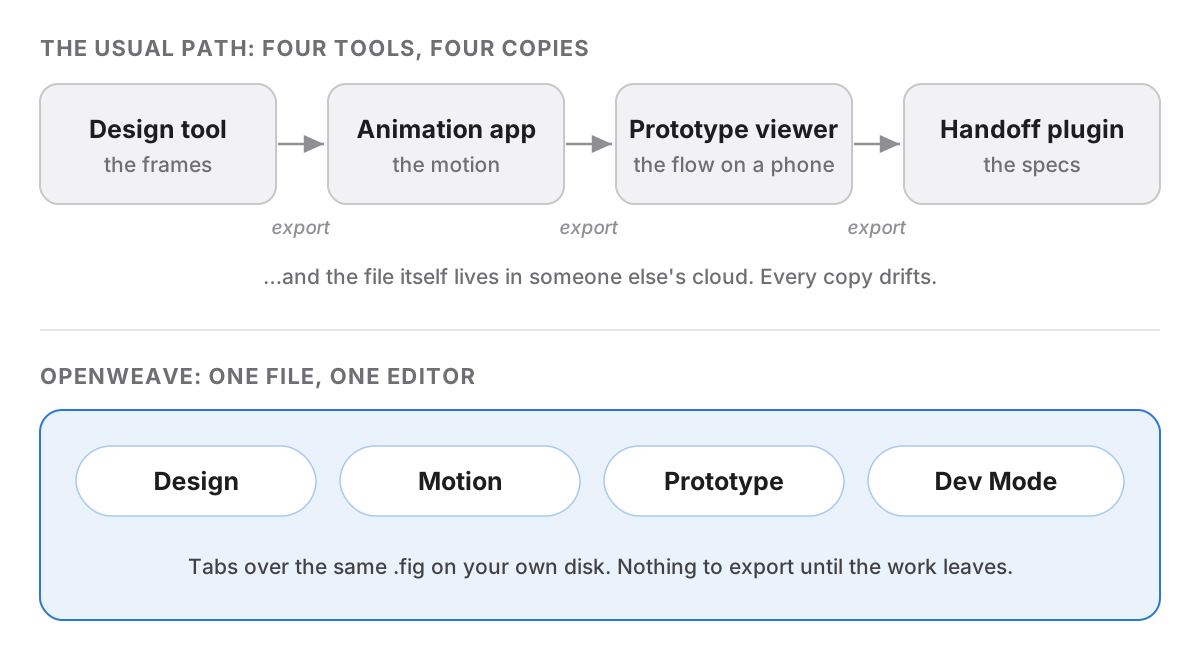
The brief I set: keep all of that in the one file, on your own machine, in the same editor you drew it in.
Key Decision: Rebuild the Shell in React
The fork's app and its headless SDK were written in Vue. Before adding anything, I moved both to React and the app to Next.js: the editor shell, every panel, and the SDK's components and hooks, one family at a time, with the old Vue files kept recoverable from history in case a port missed something.
This was the slowest and least visible month of the project, and the one everything else stands on. The SDK is the piece other people build with, and React is where most teams who would embed a design canvas already live. It is also the stack I design and build in every day, which meant every feature after this could go from sketch to working panel without switching mental models.
| Layer | In the fork | In OpenWeave |
|---|---|---|
| Editor app | Vue | React on Next.js |
| SDK for custom editors | Headless Vue components | Headless React components and hooks |
| Desktop shell | Tauri (Rust) | Electron, same app code |
| Engine: scene graph, renderer, file codecs | Framework-free TypeScript | Unchanged |
The engine underneath (scene graph, renderer, file codecs) didn't move. The split between a framework-free core and a thin UI layer is what made a migration this size possible at all.
Key Decision: Motion Lives Next to the Layers
Animation is where I wanted OpenWeave to feel most different, so it got the deepest design work.
The Motion tab sits beside Design and Prototype in the inspector, and a timeline docks under the canvas. Each animated layer gets a row; each property (position, scale, rotation, width, opacity) gets its own track of keyframes. You can scrub, loop, change playback speed, or turn on recording and simply move things on the canvas to write keyframes, which is how most people think about motion anyway.
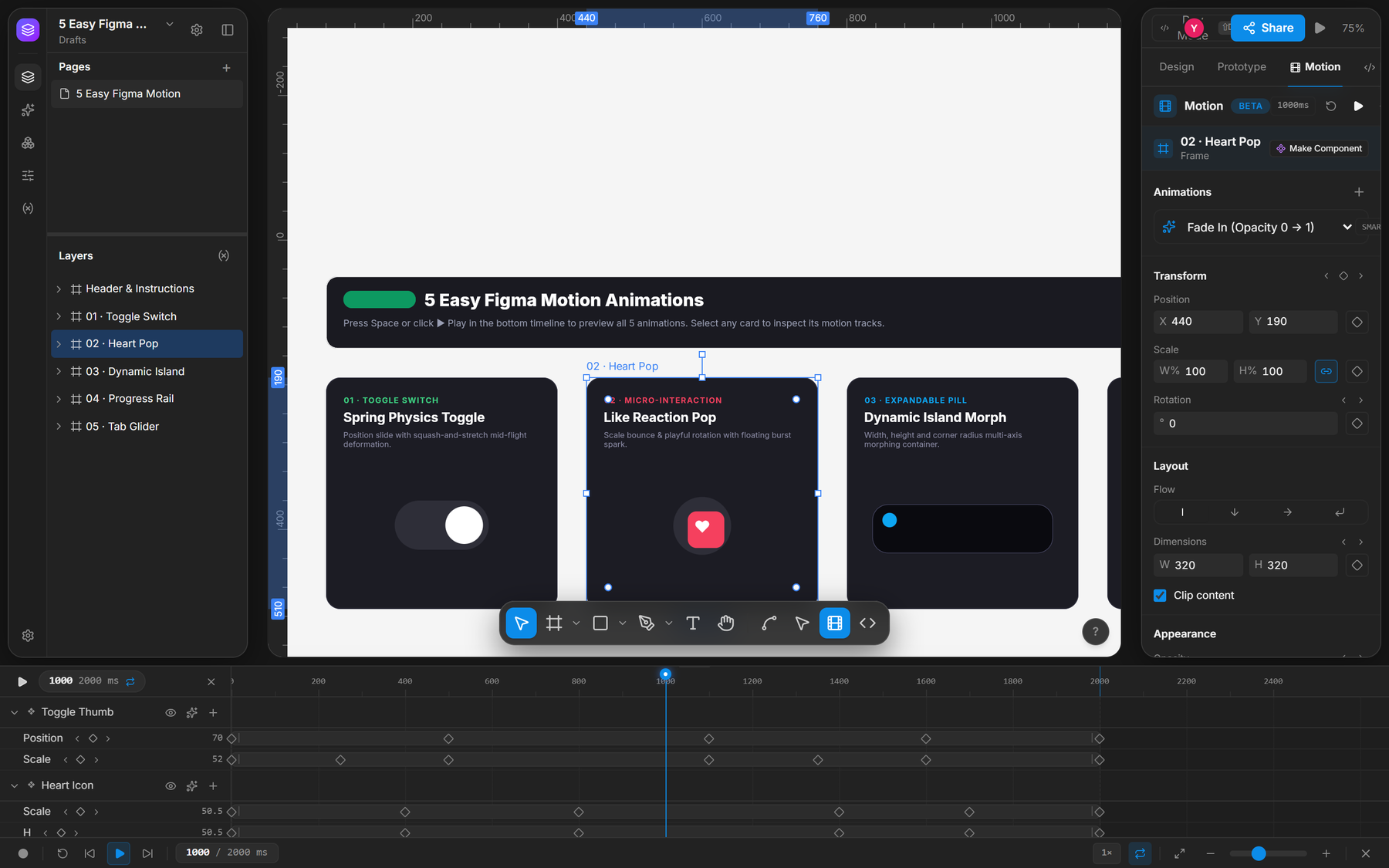
Three details carry most of the feel:
- Easing you can see. A bezier curve editor and spring presets sit in the keyframe popover, and the path a layer travels is drawn on the canvas as a trajectory, so you adjust motion where it happens.
- Presets as a starting point. Fade in, slide up, scale pop, spring bounce, and pulse drop a working animation on any layer; then you edit the tracks like any other.
- Motion that leaves as code. Any track exports as CSS keyframes, Framer Motion, or the Web Animations API, with easings mapped to each format, so an animation is a spec a developer can paste, not a video they have to imitate.
Motion tracks are saved inside the document and survive save and reopen. That sounds obvious; it was a bug I had to fix, and it's the difference between a demo and a tool.
Key Decision: Prototypes on Real Hardware
A phone screen on a white canvas doesn't read as a phone. So prototypes can sit inside device frames (iPhone 16 Pro and Pro Max, Pixel 9, iPad Pro, MacBook Pro), in dark, light, or titanium finishes and either orientation.
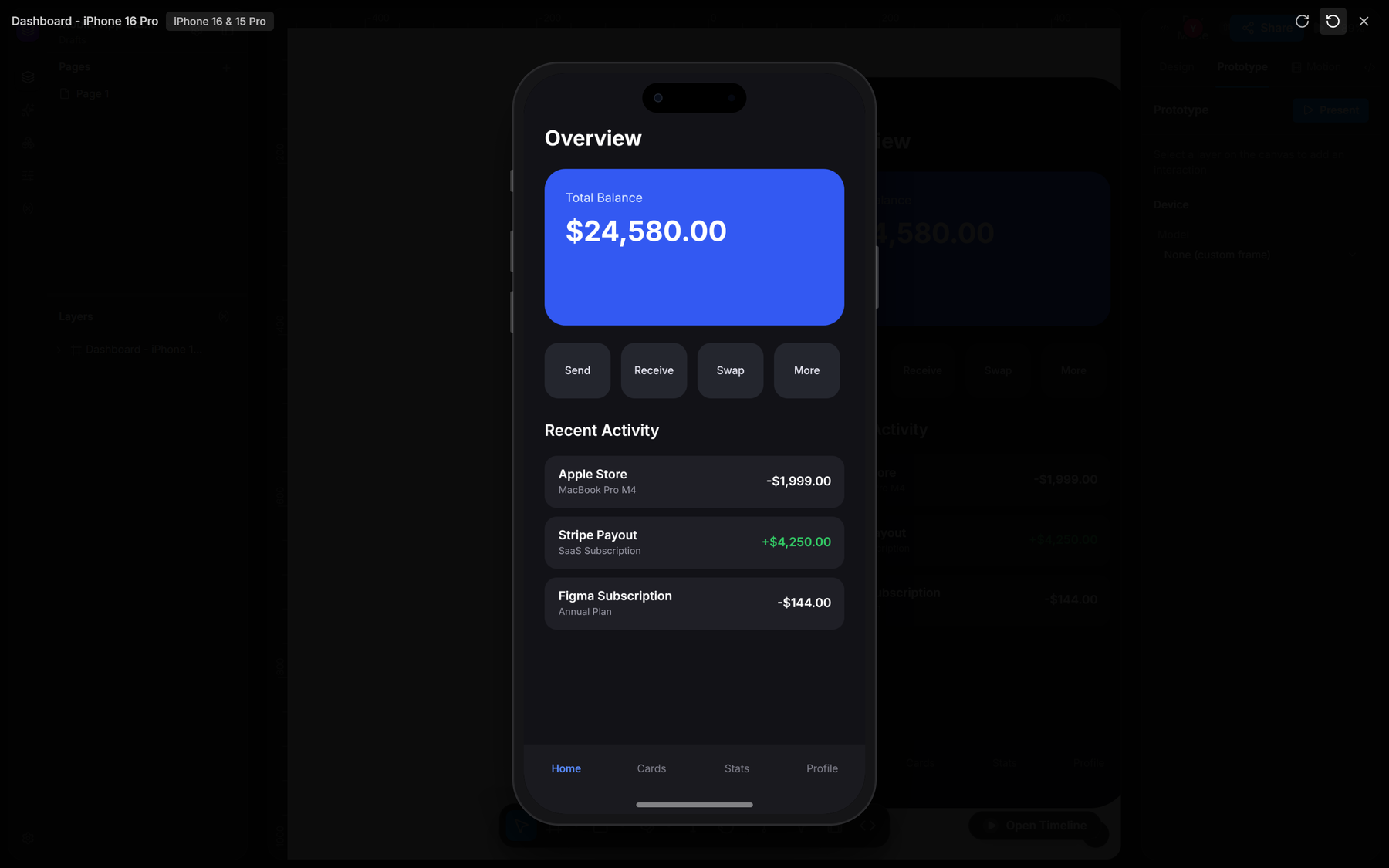
The frame is a property of the page, not a layer, so it can't get nudged or deleted by accident while you edit the screens inside it. Prototype links round-trip through the .fig format, including hotspot connections and transition curves, so a flow wired in OpenWeave still works when the file goes back to Figma.
Key Decision: Zoom That Means Real Size
A device frame gets the shape right, but not the size. A screen at 83% zoom tells you nothing about how big a button will feel under a thumb. The usual check is a screenshot sent to your phone, or opening the file on mobile and waiting for it to load. Both work, and both break the flow.
So I added a calibration step. You hold any standard card against the screen (a bank card or an ID, which are all 85.60 × 53.98 mm) and drag a slider until the outline on screen matches the card in your hand. That one measurement gives the display's real pixel density.
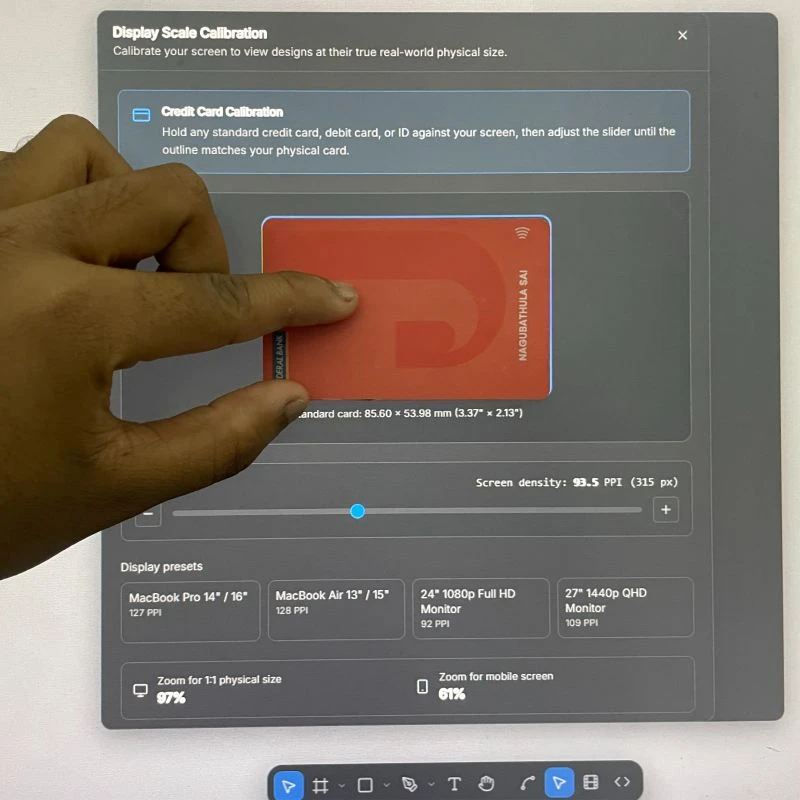
From there, zoom finally means something. One command jumps to 1:1 physical size (97% on my monitor) and another to the size the selected frame would be on an actual phone (61%). The editor remembers the calibration for that display, and there are presets for ten common laptops, MacBooks, and monitors for anyone who doesn't want to hunt for a card.
It was a small feature that quickly became the one I use most. Seeing designs at true size is slightly rude in a useful way: buttons that looked fine at a random zoom suddenly look huge, and type that felt premium reads like a poster. I wrote about it on LinkedIn when it shipped.
Key Decision: Handoff Without Leaving the File
Dev Mode is one shortcut away (Shift+D). The inspector swaps from editing controls to code: CSS, Tailwind, and JSX for the selection, measurements on the canvas, and redline annotations a designer can leave for whoever builds it.
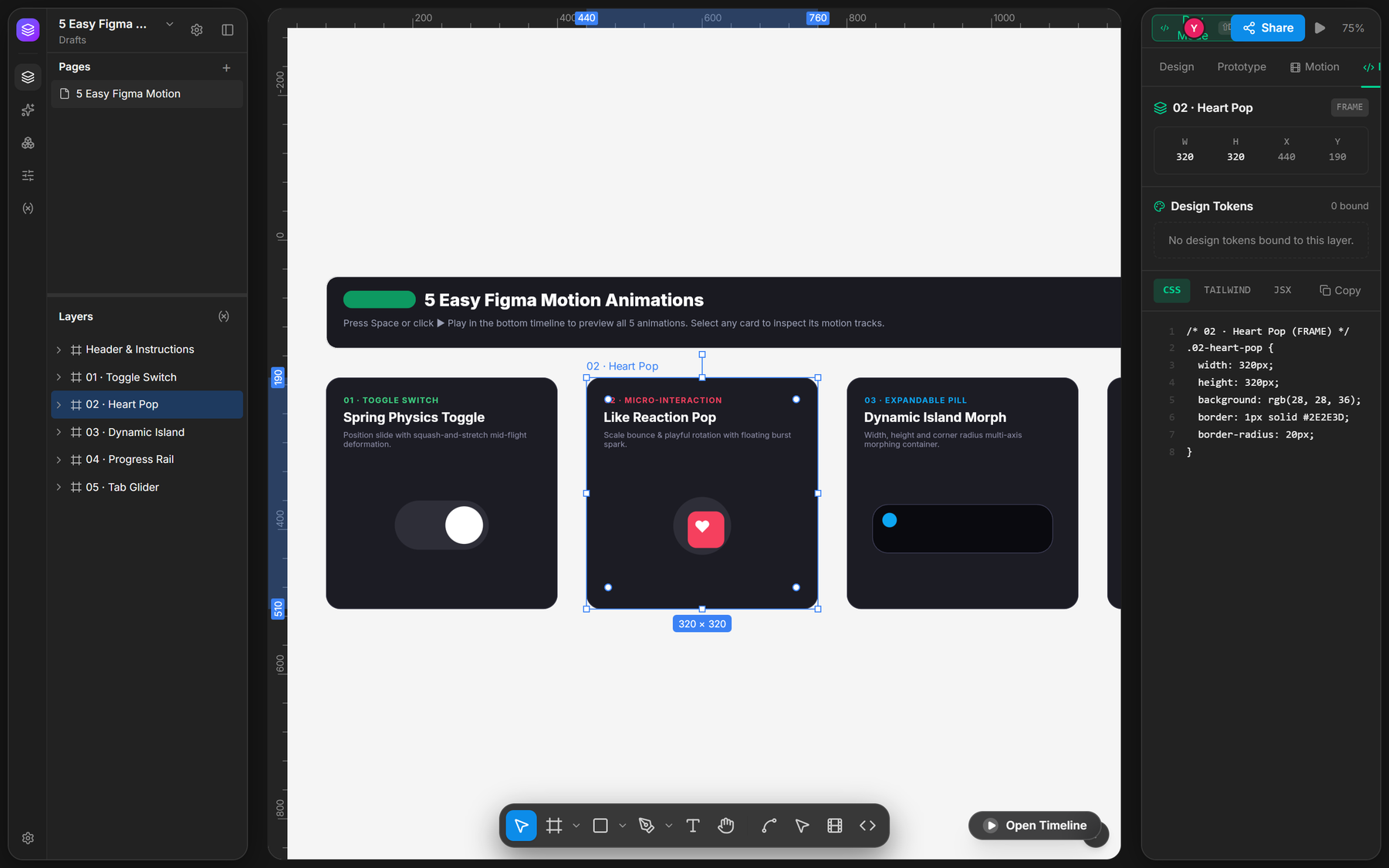
I kept it a mode of the same editor rather than a separate viewer on purpose. A developer looking at Dev Mode is looking at the real file, not a snapshot exported last Tuesday, and switching back to editing is the same keystroke.
Key Decision: Shaders as Layers
Gradients and blurs cover most backgrounds, but the backgrounds people actually ship now move: animated gradients, noise fields, particles that drift toward the cursor. Designers usually fake these with a looping video.
OpenWeave renders with Skia, and Skia can run small GPU programs (SkSL). So any layer can take a shader as its fill, live on the canvas. There are six presets (animated gradient, noise field, particles, metaballs, lighting, and displacement) and a custom slot for your own SkSL.
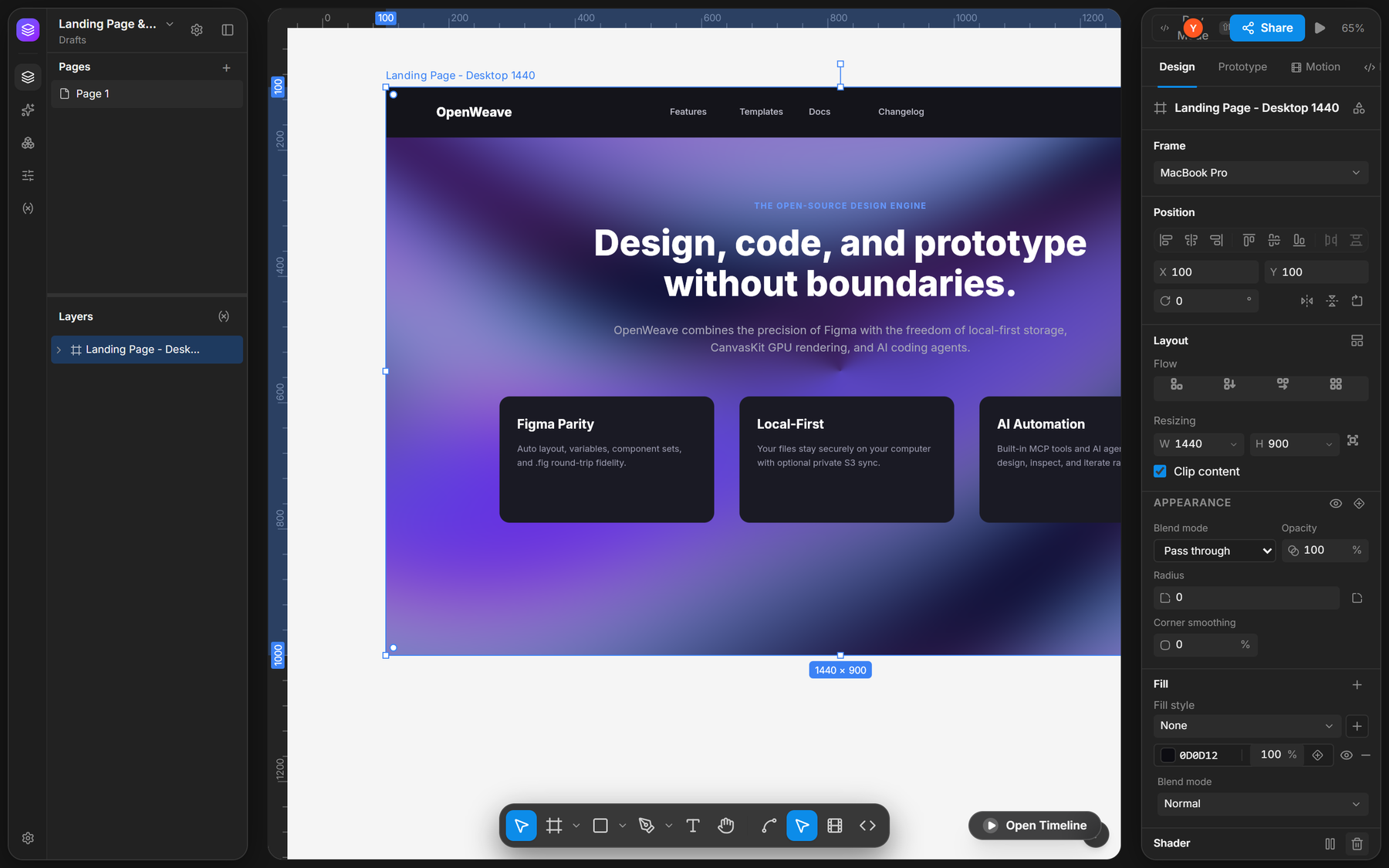
Every preset shares the same handful of controls (four colors, speed, scale, intensity, complexity, and how strongly it follows the pointer), so learning one teaches all of them. They run live on the canvas and react to the pointer, so a reviewer sees the background moving instead of reading a note that says it will.
Sharing a File That Lives on Your Disk
Local-first has a catch: if the file is on your machine, how does a reviewer get in?
This was the biggest roadblock of the project. The standard answer is a server, and a small cloud instance runs about $20 a month. But the whole point of OpenWeave is that it runs on your own machine, offline, for free. Paying rent on a server just so two people could look at one canvas would have broken that promise on day one.
Collaboration is peer-to-peer over WebRTC, with live cursors and follow mode, so the document travels directly between people and is never stored on a server. Peers find each other through public MQTT brokers, which only pass the handshake. That covers people who can reach your machine. For everyone else, I used ngrok: the desktop app can run local commands, so it opens a tunnel to your local editor and copies a public link in one click. A local, offline app becomes a shared workspace without deploying anything.
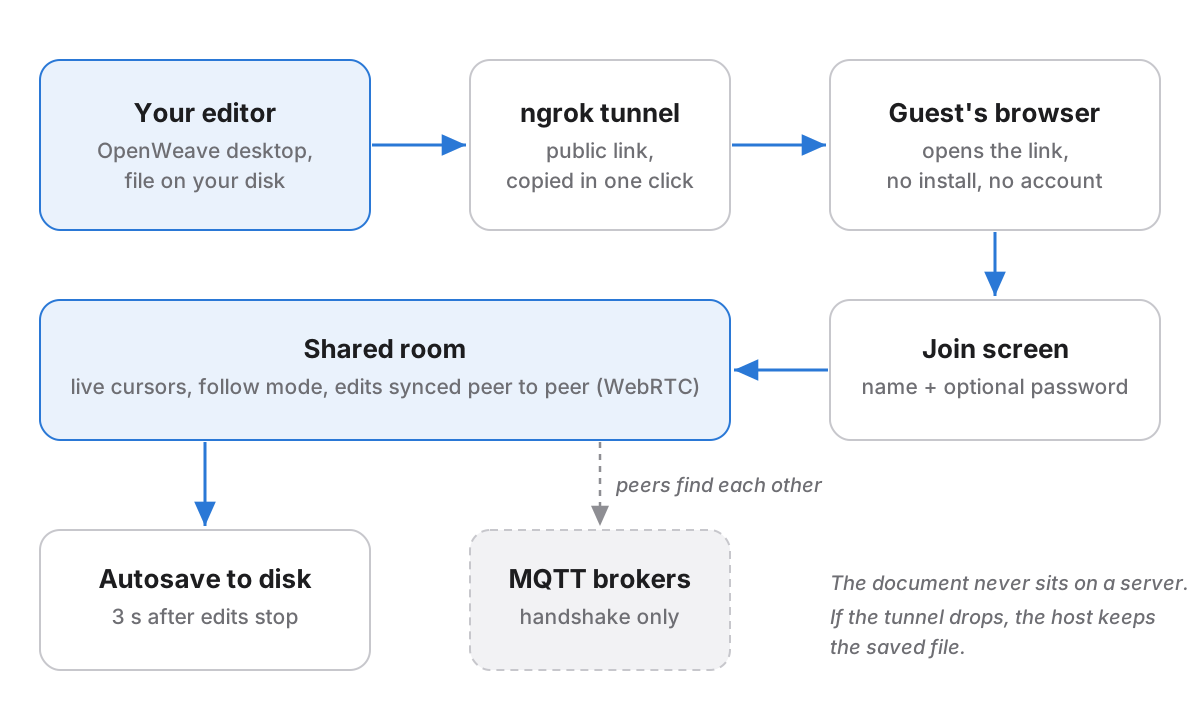
Opening that link doesn't drop a stranger straight onto your canvas. They land on a join screen first and can be asked for a room password, because a link that leaks shouldn't mean a file that leaks.
A tunnel also brings an obvious risk: what if your Wi-Fi drops mid-session? The host's copy is the real one, and it autosaves to disk three seconds after the edits stop, so a dead tunnel costs the connection, not the work. To make sure there is a file to autosave into, a new document's first save now goes straight to Documents/openweave without a file dialog. I also made the tunnel recover on its own when ngrok reports an endpoint is already online, the most common way it failed in testing. I wrote about this roadblock on LinkedIn while building it.
Key Decision: Trading Size for a Working Clipboard
The fork shipped as a Tauri app, around 7 MB. Small is good, and I didn't want to give that up lightly.
What changed my mind was the clipboard. Copying layers out of Figma puts them on the system clipboard as HTML, and on Windows Tauri's clipboard plugin could only read plain text. I wrote a Rust command to read the HTML format directly, and it worked, but it was one more piece of native code next to the Rust that ran the ngrok tunnel, and the list was only going to grow.
Electron has all of that built in, so I moved. The size cost is real, and I accepted it.
| Tauri | Electron | |
|---|---|---|
| Download size | About 7 MB | Much larger: it ships its own Chromium |
| Reading Figma layers from the clipboard on Windows | Text only; needed a custom Rust command | Built in |
| Running ngrok and other local tools | Custom Rust | Node's process API |
| Changes to the editor code | — | None: the preload speaks Tauri's IPC protocol |
To keep the move from rippling through the app, the Electron preload speaks the same IPC protocol the Tauri bridge did, so the editor code didn't have to change at all to run in the new shell.
Also on the Canvas
Smaller pieces that make everyday editing feel finished:
- Vector networks and path editing. Edit points and handles directly on the canvas, with a curvature pen tool for drawing smooth paths without dragging handles.
- Image crop in place. Crop, move, and transform an image inside its fill on the canvas instead of in a dialog.
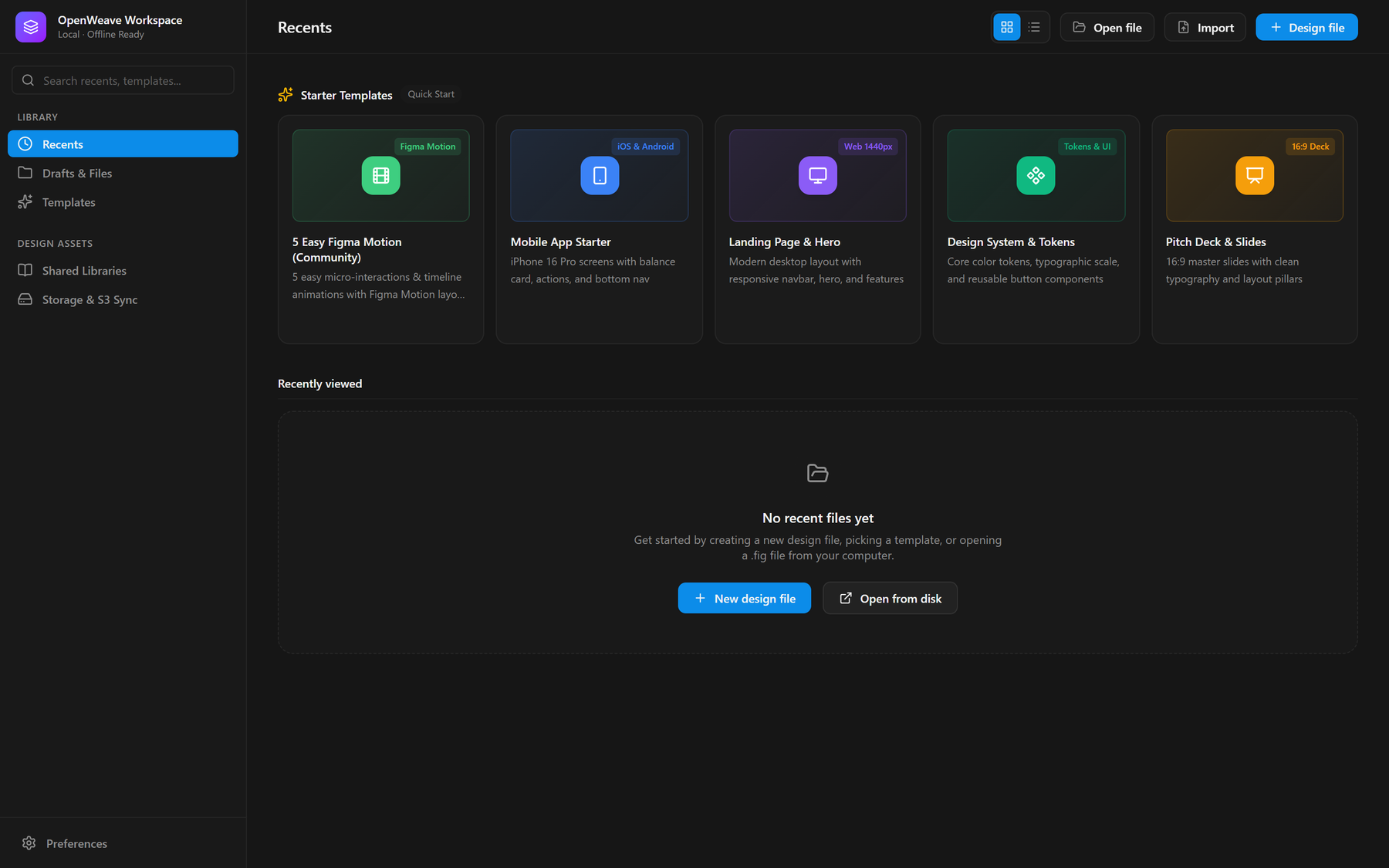
- Starter templates. The home screen opens with working files (a motion showcase, a mobile app, a landing page, a design system, a slide deck) so the first thing you see is the editor doing something.
What This Project Taught Me
Credit the foundation, then build past it. Starting from someone else's open-source engine let me spend my time on the parts designers feel. Being clear about where their work ends and mine begins made it easier to decide what to build, too.
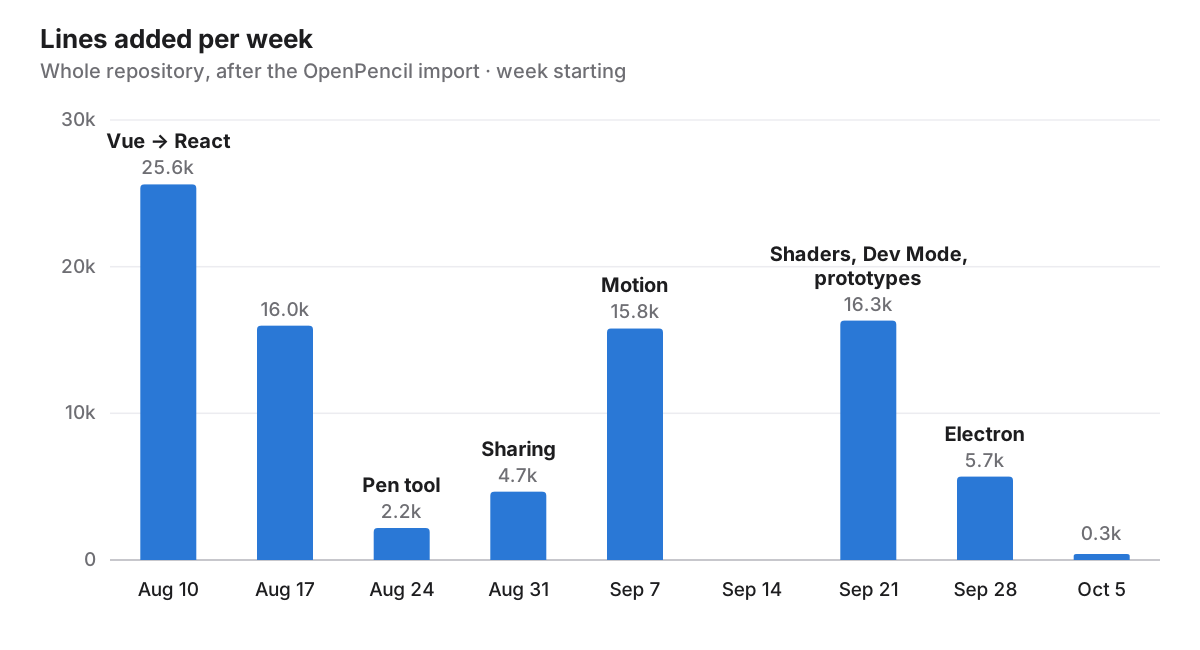
Do the invisible migration first. Moving the app to React delivered nothing a user could see. Every feature after it shipped faster because of it. The git history shows the shape: two heavy weeks of migration, then features in bursts.
Export is a design surface. Motion that exports as code, prototypes that round-trip to .fig, Dev Mode on the live file: the features that mattered most were about what leaves the editor, not what happens inside it.
What's Still Missing
The honest list of what isn't done:
| Gap | Why it matters | Next step |
|---|---|---|
| The download is no longer small | Electron costs far more disk than the 7 MB Tauri build, and the README still describes the old build | Measure the real installer size and update the docs |
| Motion is in beta | Code exports one layer at a time, so a multi-layer sequence has to be stitched together by hand | Export a whole timeline as one component |
| Sharing leans on public brokers | Free public MQTT servers are fine for a demo, not for a team to depend on | A self-hostable signaling option |
| A brand-new file isn't autosaved | Autosave starts after the first save, and sharing doesn't trigger one | Save the file automatically when a share starts |
| Shaders stay in OpenWeave | Settings survive save and reopen in the .fig, but Figma can't render them and Dev Mode has no code for them | Shader code in Dev Mode, with a static fallback for Figma |